
Download SPS Swaraj APK – GST ready, MRP calculator, accounting software, business finance, inventory management, easy-to-use, small business accounting
Overview
SPS Swaraj is a free Android application developed by Gourav Garg, designed to support businesses in managing their financial operations efficiently. Positioned within the Business & Productivity category, specifically under Finance, the app serves as a lightweight desktop alternative for small business owners who need reliable accounting tools. It is tailored for users seeking a simple, accessible solution to handle daily financial tasks without requiring advanced technical knowledge. The software is particularly focused on compliance with India’s Goods and Services Tax (GST) regulations, making it a relevant tool for businesses operating in the Indian market. It also includes functionality for Maximum Retail Price (MRP) calculations, which supports pricing accuracy and inventory tracking. The app’s design emphasizes usability, with a straightforward interface intended to reduce the learning curve for new users. While specific real-world usage scenarios are not detailed, the software appears suited for small retailers, shopkeepers, and micro-enterprises managing sales, invoicing, and tax reporting. The developer did not provide additional information about the app’s development background or broader product ecosystem.Key Features & Capabilities
- GST Ready Compliance: SPS Swaraj is designed to meet current GST regulations, enabling businesses to generate tax-compliant invoices and reports. This feature is critical for organizations required to file periodic GST returns and maintain proper documentation.
- MRP Calculator: The app includes a built-in MRP calculation tool, allowing users to set pricing based on cost, margin, and tax rates. This helps in maintaining consistent and accurate pricing across products.
- Simple Accounting Functions: Core features include transaction logging, invoice creation, and basic financial tracking, all accessible through an intuitive interface. These tools support day-to-day business operations without requiring complex accounting knowledge.
- Inventory Management Support: The software facilitates tracking of product stock levels and pricing, aiding in inventory control and minimizing overstock or stockouts.
- Mobile-First Design: As an Android application, it is optimized for use on smartphones and tablets, offering flexibility for on-the-go business management.
User Interface, Workflow & Performance
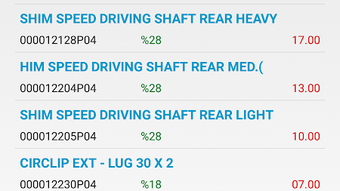
The user interface of SPS Swaraj is described as simple and intuitive, which suggests a clean layout with minimal clutter and logical navigation. Users can likely access core functions—such as creating invoices, managing inventory, and viewing reports—through clearly labeled menus or icons. The workflow appears streamlined, with a focus on reducing steps required to complete common tasks like entering sales data or generating a tax invoice. While specific performance metrics are not provided, the app’s lightweight size of 25.7 MB indicates it is optimized for devices with limited storage and processing power. The developer did not specify resource usage details, such as CPU or RAM consumption, nor did they provide information on app stability or responsiveness under heavy use. General software behavior patterns suggest that the app should operate smoothly on modern Android devices. However, actual performance may vary depending on device hardware and background processes. No reports of crashes or bugs were mentioned in the provided information.Compatibility & System Requirements
SPS Swaraj is designed for Android operating systems, though the specific version requirements were not listed. The app has a file size of 25.7 MB, which suggests it is optimized for devices with moderate storage capacity. The developer did not specify exact hardware requirements, such as minimum RAM or processor speed. Compatibility information was partially provided, with the OS clearly stated as Android. Users should ensure their device meets general Android app compatibility standards, such as supporting the latest Android security updates. The app’s free availability on the Google Play Store or other APK platforms makes it accessible to a wide audience. However, the developer did not indicate whether the software supports older Android versions or alternative platforms like iOS or Windows.Pros and Cons
Pros
- Free to download and use, reducing entry barriers for small businesses.
- GST-ready functionality supports compliance with Indian tax regulations.
- Includes an MRP calculator to assist with accurate pricing and margin control.
- Simple and intuitive interface suitable for non-technical users.
- Lightweight size (25.7 MB) ensures compatibility with low-end devices.
- Designed for on-the-go use, ideal for mobile-first business owners.
Cons
- Exact system requirements were not specified, limiting user preparation.
- No information on cloud sync or data backup features.
- Limited to Android; no support for Windows or Mac platforms.
- Functionality appears basic—may not suit larger or more complex businesses.
- Developer did not provide details on update frequency or long-term support.
FAQ Section
Is SPS Swaraj compatible with all Android devices?
The app is designed for Android, but specific version compatibility was not provided. Users should ensure their device meets general Android app requirements.
Is the app secure for handling financial data?
The developer did not specify security measures such as encryption or data protection protocols. Users should exercise caution when entering sensitive financial information.
Does SPS Swaraj require an internet connection?
The app’s functionality does not appear to depend on constant internet access, as it supports offline transaction recording. However, features like GST filing may require connectivity.
Can I update the app automatically?
Automatic update behavior depends on the platform (e.g., Google Play Store). The developer did not specify update frequency or manual update requirements.
Is SPS Swaraj suitable for large enterprises?
The app is designed for small businesses and may lack advanced features needed by larger organizations. It is best suited for micro-enterprises and individual shopkeepers.




.png)


